Following the conclusion of the September edition of the Advanced In-The-Wild Malware Test, we are publishing a summary in which we examine not only the effectiveness of protection but also what happens within the system between the execution of malware and its detection and neutralization.
We will examine a scenario where several solutions achieve the same effectiveness score, even though the protection process was completely different. One product stops the threat before it even executes, while another does so only after some malicious operations have been carried out. In both cases, the test result may indicate effective protection; however, from a security perspective, it is also important to consider what the malware managed to do within the system.
We want to draw particular attention to the course of the attacks, the response time of security products, and the traces left behind by the malware. Using the telemetry we’ve collected, we’ll show why the percentage of blocked threats alone does not always provide a complete picture of how protection works.
Protection Levels
In our analyses, we consider two main levels of protection:
- Web-Layer Protection, which blocks threats at the stage of accessing a malicious URL or downloading a file
- and Runtime Defense, which involves detecting and neutralizing malware after it has been executed.
In the latter case, it is particularly important to determine what actions the malware managed to perform before the security product responded and whether the effects of its activity have been removed.
In general, the course of malware activity in our test environment can be broken down into the following stages:

Did the solutions tested provide a comparable level of system protection? Let's check it out!
Attack timeline and security responses
SHA-256 sample [4f9…32f] for CatchPulse Pro:
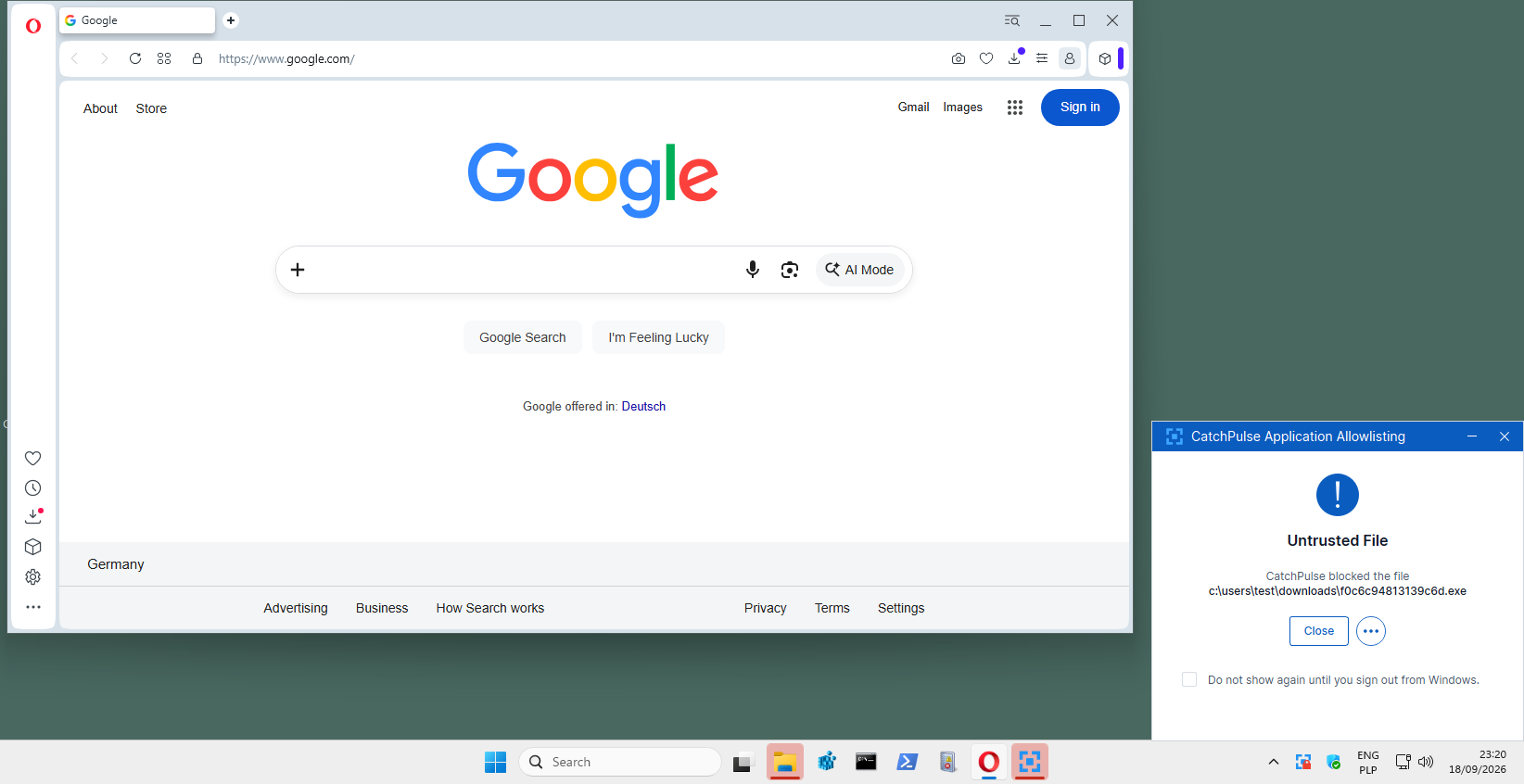
To clarify this situation, it is worth reviewing the CatchPulse Pro configuration used in our tests. We use the default settings with “Block Mode” enabled, which is responsible for blocking detected threats. In the case under analysis, the sample was not blocked at the Web-Layer Protection stage. The file was downloaded and then executed, which allowed us to observe the product’s response to an active threat.
CatchPulse Pro detected and blocked the malicious activity. But does this mean the system remained free of changes and malware remnants? Let’s check based on the telemetry data available to the vendors after the test.
Timeline:
| Time (UTC) | Action |
| 21:17:16.110 | Attempt to download malware (exe file) |
| 21:17:32.828 | Saving a sample to disk |
| 21:17:33.508 | Registering a FileCreateStreamHash event for a file |
| 21:17:33.545 | Creating a Zone.Identifier stream |
| 21:19:10.206 | Launching cmd.exe and calculating SHA256 (our test procedure) |
| 21:20:16.205 | Attempt to run malware |
| 21:20:20.609 | The SecureAge antivirus component creates a file named Blocked.log (block confirmation with technical information [1]) |
[1] For confirmation, we are also attaching a screenshot of the Blocked.log file, which shows the tested program’s response to the malware sample that was run:

In the case under analysis, the Blocked.log file was created exactly 4.4 seconds after the attempt to run the malware. However, this does not mean that the protection engine took exactly that long to detect and block the threat. Additionally, it is worth noting that the sample remained on the disk for 2 minutes and 43 seconds before the attempt to execute it. During this time, various test procedures were performed, including the calculation of the SHA256 checksum. CatchPulse Pro did not block the file at this stage. We only observed a reaction from the product after the attempt to execute the malware.
Sample SHA-256 [4f9…32f] for WithSecure Elements:
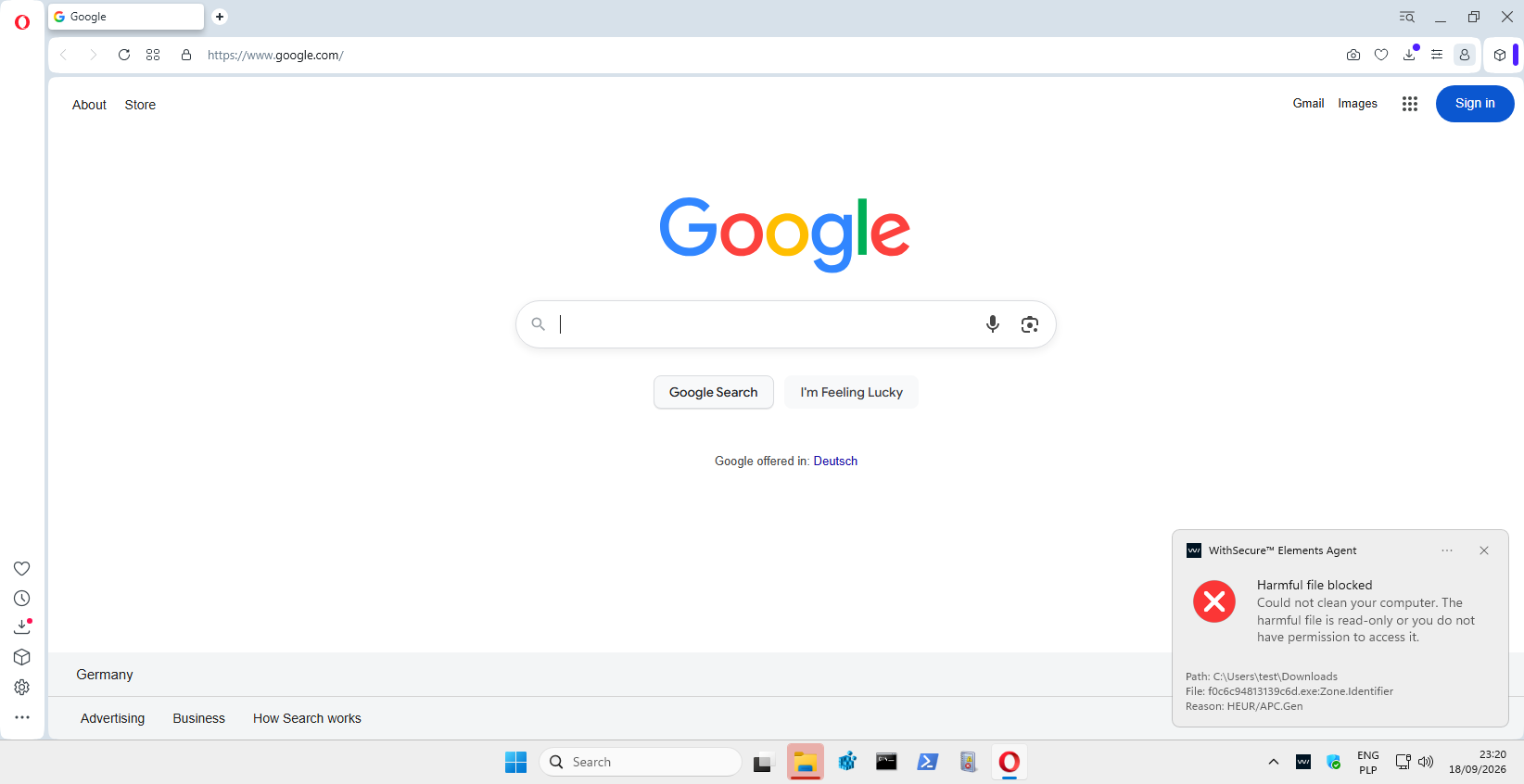
In this scenario, WithSecure did not block the threat during the file download. The sample was saved to disk and remained there for approximately 2 minutes and 38 seconds before being executed. During this time, various test procedures were similarly carried out.
The protection responded at the Runtime Defense stage. The logs show that Sysmon confirmed the execution of the malicious file and then the termination of its process after approximately 0.8 seconds. Almost simultaneously, the WithSecure component began saving data to the quarantine repository.
In the recorded events, we did not find any additional processes launched by the malware or any changes to files or the registry associated with its process. This means that the threat was stopped at a very early stage of its activity.
Timeline:
| Time (UTC) | Event |
| 21:17:22.563 | Downloading an .exe file via a web browser. |
| 21:17:38.921 | Saving a file to disk. |
| 21:17:40.258 | The Zone.Identifier identifier. |
| 21:19:10.627 | Certutil.exe calculates the SHA256 hash of a sample. |
| 21:20:16.667 | Launching malware. |
| 21:20:17.502 | Sysmon records the completion of the sample process. |
| 21:20:17.504 – 21:20:17.968 | The security product creates quarantine files. |
Sample SHA-256 [4f9…32f] for Emsisoft Enterprise Security:
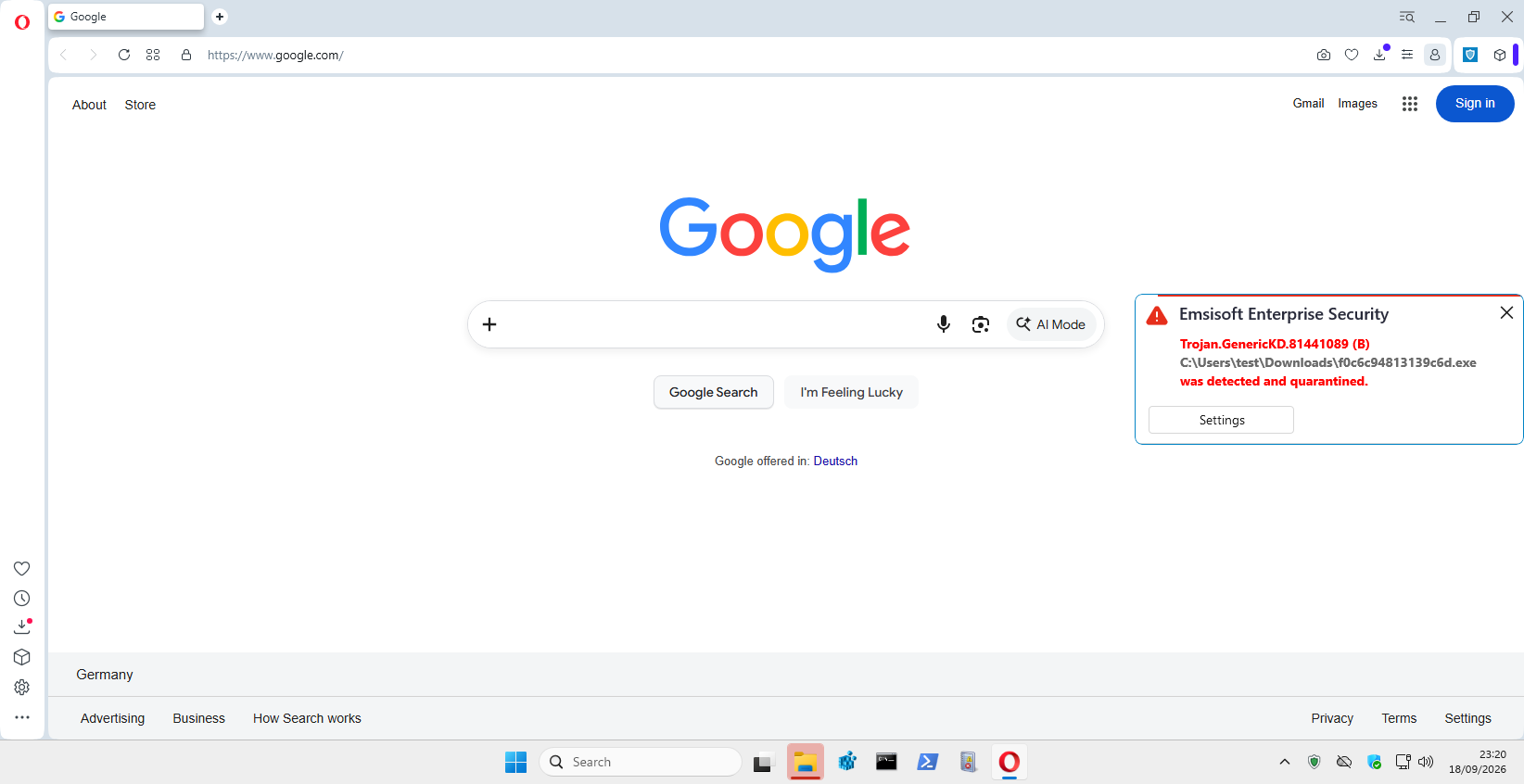
Here, based on the logs, we know that Emsisoft allowed the sample to be downloaded and saved to disk. When we later attempted to run the file, we did not observe the creation of a malware process. However, we did observe that the antivirus component “a2service.exe” logged data in the EDR log and created a file in the quarantine folder.
Based on these events, we can therefore conclude that the product intercepted the threat during the execution attempt, before Sysmon recorded the execution of the malicious file.
Timeline:
| Time (UTC) | Event |
| 21:17:10.537 | An attempt to download malware (exe) via Opera. |
| 21:17:27.756 | Saving the sample to disk. |
| 21:17:28.804 | Register a FileCreateStreamHash event for the file. |
| 21:17:28.842 | Registering a Zone.Identifier stream. |
| 21:18:07.417 – 21:18:07.690 | SHA256 Calculation (according to the test procedure using certutil.exe) |
| 21:19:09.559 | Attempt to open malware. |
| 21:19:09.561 | a2service.exe writes data to the EDR log. |
| 21:19:14.850 | a2service.exe creates an .EQF file in the quarantine folder. |
Key takeaways from these three cases
The same result does not mean that the protection works in exactly the same way
All three products blocked the threat, but the sequence of events varied. In the case of Emsisoft and CatchPulse Pro, we did not detect the creation of the malware process. WithSecure allowed it to run, after which the process was terminated after approximately 835 ms.
Downloading the file did not cause it to be blocked immediately.
In all three cases, the sample was saved to disk and remained there for more than two minutes before the attempt to execute it. During that time, we also performed various testing procedures. The security software did not react until a later stage related to the attempt to execute the threat.
Simply launching the process does not mean the attack was successfully carried out.
WithSecure allowed the malware process to be created, but it terminated after approximately 0.8 seconds. We did not detect any additional activity from the malicious file in the available telemetry. This demonstrates that even after code execution begins, the Runtime Defense mechanisms can effectively limit the threat’s activity.
Advanced In-The-Wild Malware Test
September Results (Round 5/6, 2026)
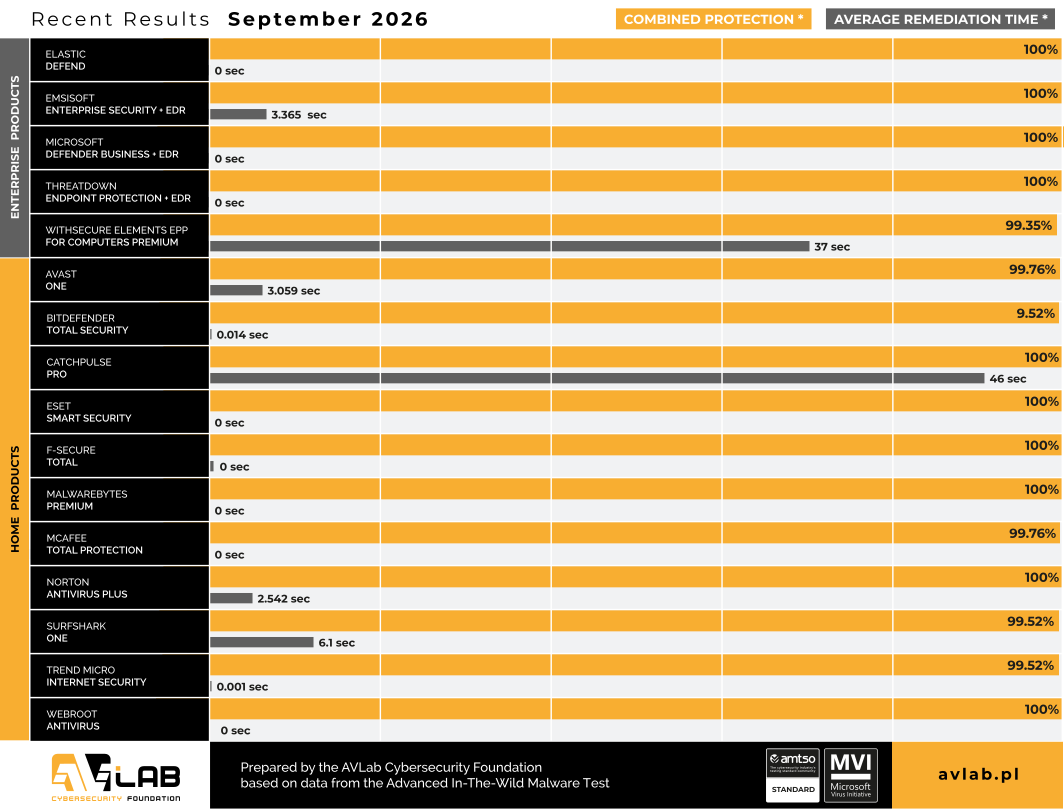
Description of the configurations of the solutions we tested
Enterprise Solutions

Elastic Defend + EDR
All Shields on Prevent mode + Attack surface reduction Enabled + collect all Events from workstation
Emsisoft Enterprise Security + EDR
Default settings + automatic PUP repair + EDR + Rollback + browser protection

Microsoft Defender for Business + EDR
Default policy + configuration settings („Block at First Sight” enabled + EDR in block mode

ThreatDown Endpoint Protection + EDR
Default settings + browser protection + EDR

WithSecure Elements EPP
Default settings + browser protection + Turn on Browser Protection for untrusted browsers
Solutions for Consumers and Small Business

Avast Free Antivirus
Default settings + automatic PUP repair + browser protection

Bitdefender Total Security
Default settings + browser protection

CatchPulse Pro
Default settings + Block Mode

Eset Smart Security
Default settings + browser protection

F-Secure Total
Default settings + browser protection

Malwarebytes Premium
Default settings + browser protection

McAfee Total Protection
Default settings + browser protection

Norton Antivirus Plus
Default settings + browser protection

Surfshark One
Default settings + browser protection

Trend Micro Internet Security
Default settings + browser protection

Webroot Antivirus
Default settings + browser protection
Environment Configuration
What settings do we use?
During testing, we use settings that provide full protection against threats, in accordance with the product’s capabilities and the vendor’s recommendations. We enable all available mechanisms for detecting and blocking malware, including:
- Real-time protection.
- Reputation mechanisms and cloud-based analysis.
- Internet traffic protection.
- Behavioral analysis.
- Threat detection and response capabilities (EDR/XDR).
- Dedicated security extensions for the browser, if available and capable of blocking online threats.
Policy toward PUP&PUA
In our tests, we do not use PUP/PUA samples – that is, potentially unwanted applications that are not necessarily classified as malware. Nevertheless, we recommend using protection against this type of software. In all tested products, we enable PUP/PUA detection if this feature is available. This helps reduce the risk of installing unwanted applications that may alter system or browser settings or affect the user’s comfort and security.
Incident response and event analysis
We configure the products under test to automatically respond to detected threats, in accordance with the available features and the vendor’s recommendations. This may include blocking a file from running, terminating a malicious process, moving a file to quarantine, or undoing changes made to the system. During testing, we log and analyze system events, including process activity, file and registry operations, and network connections. This allows us to determine at what stage the product stopped the threat and whether the malware managed to perform any additional actions.
Transparency in product configuration
Advanced In-The-Wild Malware Test - methodology, purpose, and scope of the study
We conduct six rounds of testing for consumer and business solutions throughout the year. We evaluate how effectively they protect against real-world malware threats by analyzing how and when they block these threats at each stage of an attack.
Web-Layer Protection – protection against Internet-based threats, including blocking malicious URLs, file downloads, and access to dangerous resources.
Runtime Defense – protection during malware execution attempts and after code execution begins, including behavioral analysis, detection of suspicious activity, and countermeasures against fileless techniques and other advanced threats.
Remediation Time – the time required to neutralize the threat and restore the system to a secure state.
During testing, we also collect system telemetry, which allows us to analyze MITRE ATT&CK techniques, infection vectors, and the tactics, techniques, and procedures (TTPs) used by cybercriminals.
About the AVLab Cybersecurity Foundation
AVLab Cybersecurity Foundation is an independent cybersecurity laboratory that has specialized in testing and evaluating the effectiveness of security solutions since 2012. We are a member of AMTSO (Anti-Malware Testing Standards Organization) and a participant in the Microsoft Virus Initiative (MVI).
We conduct tests based on real-world threats and realistic attack scenarios. We evaluate products’ ability to detect, block, and neutralize threats, while also analyzing their behavior at each stage of an attack. The published results, backed by telemetry data, help users and organizations make informed decisions about which security technologies to choose.
Advanced In-The-Wild Malware Test